# Parameters
expose(fn) calls fn and returns what it returns. In the window, each parameter of fn gets a
control; everywhere else fn gets its defaults, or the values given with --set.
from typing import Annotated

from build123d import Box
from pytypehint import Description, Label, Max, Min, Slider
from pycodecad import expose, show


def tray(width: Annotated[float, Min(20.0), Max(200.0), Slider(), Label("Width")] = 80.0,
         wall: Annotated[float, Min(0.8), Max(5.0), Description("Also the floor")] = 2.0,
         rounded: bool = True):
    ...
    return Box(width, 60, 25)


show(expose(tray), name="tray")
The full example is examples/tray.py.
# Rules
fn must be a function defined with def (not a lambda or async def). Its parameters must be
simple, so a control can always be drawn for them:
- Type
int,float,boolorstr, each with a default. - Annotated only with pytypehint
Min,Max,Step,Slider,LabelandDescription(Annotated[float, Min(0.0), ...]). Min,MaxandStepare for numbers; on astr,MinandMaxlimit its length. Abooltakes onlyLabelandDescription.Slider()needs bothMinandMax. ExclusiveMin/Maxare not supported.- Numbers within ±1e9, and a
Stepof at least 1e-6. - The default must be within
MinandMax.
Anything else raises a TypeError that names the parameter. A script can expose several
functions, each once per run (a second expose() of the same function is an error).
# Controls
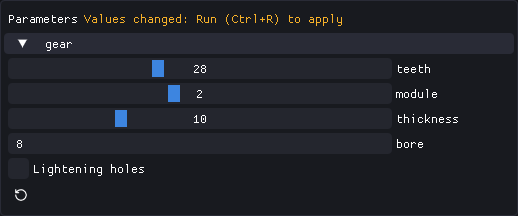
| Parameter | Control |
|---|---|
int or float with Slider() |
A slider between Min and Max (a float snaps to Step, counted from Min) |
int or float |
A number box; with Step, +/- buttons (an int steps by 1 by default) |
bool |
A checkbox |
str |
A text box (cut to Max characters) |
Label is the text next to the control (else the parameter's name) and Description its tooltip.
The panel shows one group per exposed function; values are kept within Min and Max.
# Run applies, Export uses what is on screen
- Changing a control only changes a value in memory. Run (Ctrl+R) runs the script with the new values; the panel says "Values changed: Run (Ctrl+R) to apply" until you do.
- Reset (the arrow under a group) returns that function to its defaults on the next Run.
- Export uses the values of the last good run: what is on screen.
- Values are never written into the script. When you edit the script, values whose parameter no longer exists, changed type or no longer fits are dropped and the default is used.
# On the command line
check, render and export take --set KEY=VALUE, repeatable. KEY is param or
function.param (the second wins when both are given):
pycodecad export tray.py tray.stl --set width=120 --set tray.rounded=false
pycodecad render tray.py tray.png --set width=120 --views iso,top
Values are converted to the parameter's type. A bool takes true, 1, yes, on or false,
0, no, off. The run fails (exit code 1) when:
- a key matches no parameter of any
expose()("No exposed parameter ..."), - a value is not of the parameter's type, or is outside its Min and Max.
Without --set, the defaults are used. check reports the values each run used in its
parameters field (Command line).
# Order forms
A template with parameters opened with pycodecad --read-only tray.py is an order form: set the
measures, Run, Export. The code is not shown and the template is never changed. See
read-only mode.