# Command line
pycodecad part.py [--read-only] [--no-run]           # the window
pycodecad parts/gear/                                # the window on a folder
pycodecad examples [folder]                          # copy the examples there once, open them
pycodecad check part.py                              # run it, print the result as JSON
pycodecad render part.py out.png [--views ...] [--size WxH] [--frame N]
pycodecad export part.py out.stl [--profile bambu]   # also .3mf .step .glb .brep
pycodecad context part.py                            # the AI context
pycodecad --version
The window is described in The window. check, render and export run the script fresh, without a window, in a child process, and take
--set KEY=VALUE for parameters. pycodecad <command> --help
lists the options of each command.
# examples
pycodecad examples copies the examples that come with pycodecad to ./pycodecad-examples (or the
folder you give) and opens the window on it. When the folder already exists it is opened as it is,
so your changes to the examples stay. --no-run opens it without running.
# check
Runs the script and prints the result as JSON:
pycodecad check part.py
{
  "ok": false,
  "file": "/home/me/parts/part.py",
  "error": "ZeroDivisionError: division by zero",
  "where": "/home/me/parts/part.py:2",
  "traceback": "Traceback (most recent call last):\n  File ...",
  "stdout": "",
  "warnings": [],
  "objects": [],
  "objects_total": 0,
  "frames": 0,
  "parameters": [],
  "duration": 0.002,
  "time": "2026-09-26T07:52:08",
  "pycodecad": "X.Y.Z"
}
| Field | Meaning |
|---|---|
ok |
The script ran without an error |
file |
The script |
error |
The last line of the error, or null |
where |
file:line in your own code where it failed, or null |
traceback |
The traceback of your own files |
stdout |
What the script printed (the end of it when long) |
warnings |
For example "Nothing shown: call show(...)" or an absolute path |
objects |
Each shown object: name, color (#RRGGBB), volume (mm³, null if not a solid), bbox (min, max) |
objects_total |
The number of objects (the list stops at 1000) |
frames |
The number of frames of an animation (frame() calls); 0 for a still scene |
parameters |
Each exposed function with its parameters, limits, default and the value the run used |
duration |
Seconds the run took |
time, pycodecad |
When it ran, and the pycodecad version |
The same JSON is left in .pycodecad/part.py.last-run.json after every run (Files).
# render
Writes a PNG without a window (off-screen OpenGL), with edges, grid and axes:
pycodecad render part.py out.png                                         # iso view, 800x600
pycodecad render part.py out.png --views front --size 1200x900
pycodecad render part.py out.png --views iso,front,top,right --size 600x450   # a labeled grid
pycodecad render part.py out.png --views window                          # what the window shows
pycodecad render part.py out.png --frame 30                              # frame 30 of an animation
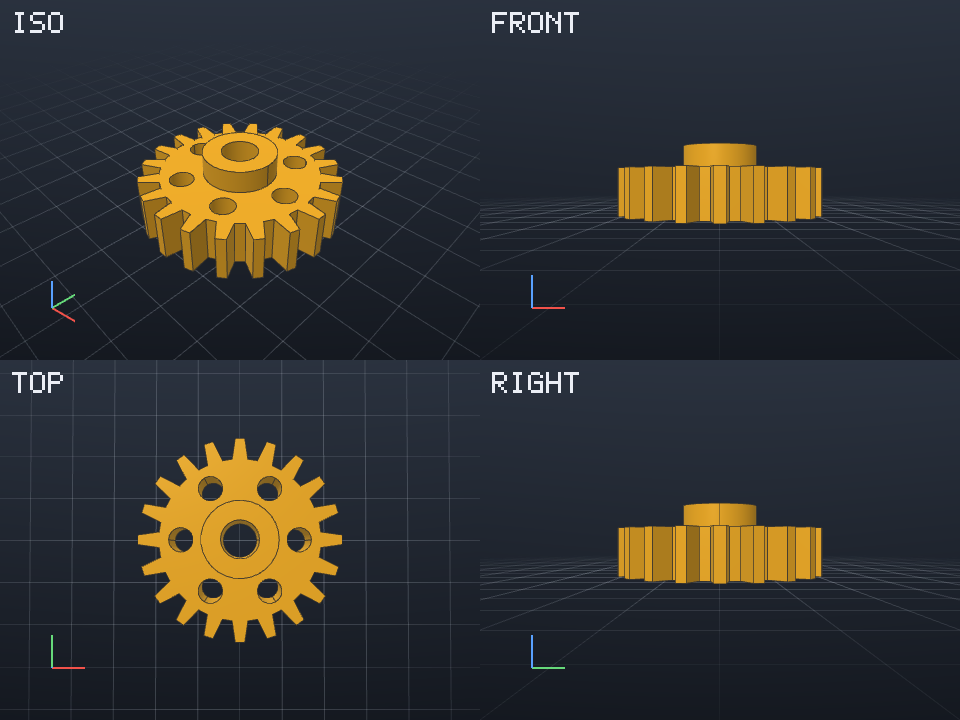
--viewstakesiso,front,back,left,right,topandbottom. Several, separated by commas, make a grid two columns wide, each view labeled.--views windowuses the camera of the window, as you last left it, and its view size. It is saved about a second after the camera stops moving, and cannot be combined with other views.--size WIDTHxHEIGHTis the size of each view, 1 to 8192 pixels per side (default 800x600, or the window's size with--views window).
# export
pycodecad export part.py part.stl
pycodecad export part.py part.3mf --profile bambu
The format comes from the extension:
| Extension | Format |
|---|---|
.stl |
STL, for 3D printing |
.3mf |
3MF, one named, colored object per show() |
.3mf --profile bambu |
3MF that Bambu Studio opens with names and colors |
.step |
STEP, for CAD |
.glb |
GLB, for the web |
.brep |
BREP (OpenCascade) |
STL, 3MF, STEP and BREP exports use the real build123d shapes; GLB uses the preview triangles and
edges. A scene with meshes from import_mesh() can be exported as STL, 3MF or GLB, not STEP or
BREP. export prints what the script printed, then Wrote <path>.
# context
pycodecad context part.py
Runs the script and prints the text of Copy AI context: see Working with an AI assistant.
# Checked before running
Wrong arguments are reported before the script runs, with exit code 1:
renderoutput not ending in.png, an export extension that is not one of the formats above,--profileon a file that is not.3mf;- an output folder that does not exist;
--sizenot like800x600or outside 1..8192;- an unknown view,
windowcombined with other views, or--views windowbefore any window saved a camera for that script.
A malformed option (an unknown --profile, --set without =) is an argparse error: exit code 2.
# Exit codes
| Code | When |
|---|---|
| 0 | Success. check also returns 0 when the script runs but shows nothing (with a warning) |
| 1 | The script failed (check prints the JSON, render/export the error on stderr); render or export of a script that shows nothing; wrong arguments; a file that cannot be read |
| 2 | Malformed command line (argparse) |
| 130 | Interrupted |
# Ctrl+C
Ctrl+C (or SIGTERM, SIGHUP) stops the running script at once (on Linux with anything it started) and pycodecad exits with 130. The last-run file then says "Stopped".