# Embedding pycodecad in your app
Experimental.
pycodecad.embedworks and is tested, but its names and details may change in a minor version. The window (pycodecad file.py), the command line and the script API are stable.
The pycodecad window is made of parts you can use in your own native app: a Workspace (files, code, parameters and 3D view of a part, exactly like the window) and a Viewer (only a 3D view). They are Dear ImGui components: your app draws them inside its own ImGui windows, in its own frame loop.
Use it when a script is not enough and a new program would be too much: an order desk that fills
in the parameters of a template, a tool that shows several parts side by side, a panel for a
machine. Everything else stays as in the window: the script runs only when you call run(), the
file is written only on save(), each run is a child process.
# Example
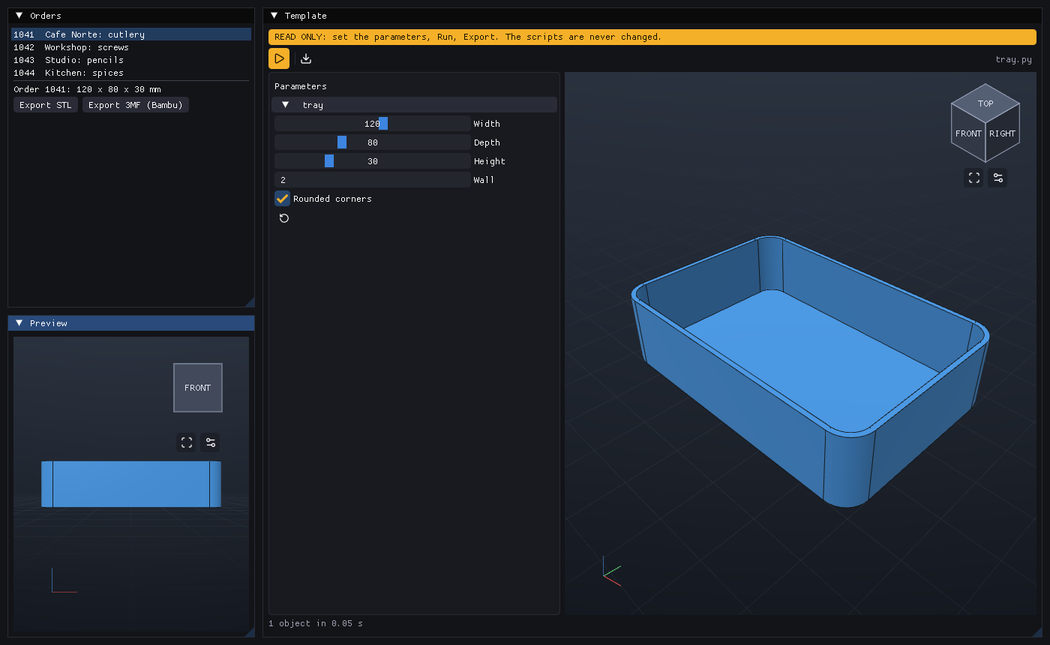
examples/embedded_app.py: pick an order, the tray of
tray.py is rebuilt to its measures, a second view shows it from the front, and Export
writes one file per order.
from slimgui import imgui
import pycodecad.embed as p3

window = p3.create_window("My app")
part = p3.Workspace("part.py")           # code + parameters + 3D view, like the pycodecad window
viewer = p3.Viewer()                     # only a 3D view, with a camera of its own

while window.frame(keep_open=part.dirty()):
    imgui.begin("Part")
    part.draw()                          # fills the available region of the ImGui window
    part.close_prompt(window)            # Save / Discard / Cancel when closing with unsaved changes
    imgui.end()

    imgui.begin("Orders")
    if imgui.button("Order 42"):
        part.values["tray.width"] = 150.0
        part.run()                       # explicit, as always
    imgui.end()

    imgui.begin("Preview")
    viewer.draw(part.shown)              # the same objects, another camera
    imgui.end()
window.close()
Draw a Workspace before the widgets that read its state: draw() also collects finished runs, so
what is drawn after it sees this frame's results.
# Reference
# create_window(title="pycodecad", size=(1440, 880), visible=True) -> Window
A new GLFW window with an OpenGL 3.3 context and pycodecad's ImGui backend (fonts, icons, style).
visible=False makes a hidden window (tests, screenshots).
# Window(handle, ctx=None, owns=False)
pycodecad's ImGui backend on a GLFW window you already have (see
Your own GLFW window). create_window makes one with owns=True.
frame(keep_open=False) -> bool: show the frame built since the last call, wait for input (up to 0.25 s, less while a script runs) and begin the next ImGui frame. False when the window closes. Withkeep_open=Truea close request does not close it:close_requestedbecomes True instead.close_requested: the user closed the window whilekeep_openwas True.request_close(): close as if the user did.set_title(title),screenshot(path)(a PNG of the frame, written when it is shown).close(): close every open Workspace and Viewer (their runs are killed), then the backend; also the window and GLFW when it owns them.handle(the GLFW window),ctx(the moderngl context),events(this frame's typed text and key presses).
# Workspace(path, read_only=False, run=True)
A part, like a pycodecad window: the .py files of a folder, one of them edited, the main one run (see
A part in several files). path: the main file, or the
folder. A missing main file is created from a small example (not when read_only). read_only:
an order form, as --read-only: no code, no script is written, and
choose(path) runs another file of the folder. run: run the main file once when
build123d has loaded. Raises OSError when the file cannot be used.
-
draw(): update, then draw into the available region of the current ImGui window. Its keyboard shortcuts (Run, Save, Save as, code zoom) work while that ImGui window has the focus. -
update(): start a requested run, collect finished runs, notice changes on disk.draw()calls it; call it every frame yourself for a Workspace you do not draw. -
close_prompt(window): the Save / Discard / Cancel prompt, shown after the user closes aframe(keep_open=part.dirty())window. Save or Discard closes the window. -
Actions:
run()(the main file, with the editor's text for the edited file),stop(),save() -> bool,save_as(path) -> bool,reload(),discard()(drop the unsaved changes),export(extension, profile="generic", target=None)(targetis relative to the folder; by default the main file's name with that extension),close(). -
Files:
open(path, line=None) -> booledits another file (relative to the folder;lineputs the cursor there); it refuses, with a message, while the editor has unsaved changes:save()ordiscard()first.set_main(path)makes another file the one that runs (its parameters and values start anew).files()lists the folder's.pyfiles.show_files = Falsehides the list (e.g. an app that shows only a template). -
Your app's controls (the top bar is pycodecad's, but you decide what it offers):
hidden: a set of top-bar tools not drawn, fromTOOLS:"run","save","save_as","ai_context","copy","paste","export". A hidden tool's shortcut is off too (a hidden"save"makes Ctrl+S do nothing).buttons: a list ofButton(label, action, tip="", enabled=True)drawn after pycodecad's tools.labelis an icon name ofpycodecad.icons.CODEPOINTS(drawn as the icon, e.g."cloud-upload","arrow-left","x") or text;action()runs when it is clicked. Change the list orenabledbetween frames.on_save:on_save(workspace)is called after every successful Save (the button, Ctrl+S, Save as, and Save in the unsaved-changes prompts), once the file is written. Use it to make Save mean "save to my server": uploadworkspace.folderthere. Keep it fast (the frame waits for it): start a thread for the network and report withworkspace.say(message, error).
part = p3.Workspace(folder) part.hidden = {"save_as"} # one file name per project part.on_save = lambda ws: upload_in_a_thread(ws.folder) part.buttons = [p3.Button("arrow-left", close_project, "Back to the projects")] -
State:
values({"function.param": value}, sent to the script on the next run),parameters(what the last run exposed),shown(the objects of the last good run),error,stdout,message(the status line),main(the file that runs),path(the file in the editor; the main file until you open another),folder,read_only(of the whole Workspace),dirty(),running(),ran(), andviewer(its Viewer).
# Viewer()
A 3D view with its own camera: orbit, pan, zoom, view cube, Fit, and the edges / grid / axes toggles.
draw(objects, size=None): draw a list of shown objects (e.g.part.shown) atsize(ImGui units), by default the available region. It fits the first objects it gets, and again after a large change.fit(),look_from(direction)(e.g.(0, -1, 0)is the front view),camera,display,picture() -> bytes(a PNG of the view),close().
# Your own GLFW window
Components need pycodecad's ImGui backend: it renders ImGui 1.92 textures (the font atlas, and the 3D views as OpenGL textures) and gives the code editor its keyboard input in order. If your app already has a GLFW window with an OpenGL 3.3 core context, wrap it instead of creating one, and let pycodecad replace your ImGui renderer:
glfw.make_context_current(handle)
window = p3.Window(handle, ctx=ctx)  # ctx: your moderngl context, if you have one (never released by pycodecad)
while window.frame():                # replaces glfw.poll_events / imgui.new_frame / render / swap_buffers
    ...
window.close()                       # the GLFW window, its previous input callbacks and your context stay yours
The contract:
- One
Windowper process, and its OpenGL context current while you draw. - pycodecad owns the ImGui context and, until
close(), the GLFW input callbacks of that window (close()puts back the ones it replaced). - If your app already has a moderngl context on that window, pass it as
ctx: a secondmoderngl.create_context()fails on some platforms (Wayland). pycodecad never releases a context it was given. - ImGui texture ids are OpenGL texture names, as in Dear ImGui's own OpenGL backend: your
imgui.image(texture.glo, ...)works too. - Components are drawn between
frame()calls; each has its own ImGui IDs, so several can share a window (one Workspace per ImGui window, so shortcuts go to the right one). - Keep 3MF imports inside the scripts run by the Workspace. On Linux, alternating native 3MF
reads in the host process (
import_meshor build123d'sMesher) with exports in forked runs can make lib3mf reject a UUID as duplicated. The regular window and CLI perform these operations in child processes, where this does not happen.