# FuncToWeb
Turn typed Python functions into web interfaces.
Write a normal Python function with type hints. FuncToWeb turns it into a ready-to-use web form, validates its input and runs it over HTTP. No models, no duplicated schemas, no hand-written forms.
The same function is also an HTTP endpoint, a contract published at /doc for
people and agents, an application you mount inside FastAPI, and a page your own
frontend opens in a modal.
from func_to_web import run

def divide(a: float, b: float) -> float:
    return a / b  # Any exception becomes a clean error in the page and the API

run(divide)  # http://127.0.0.1:8000
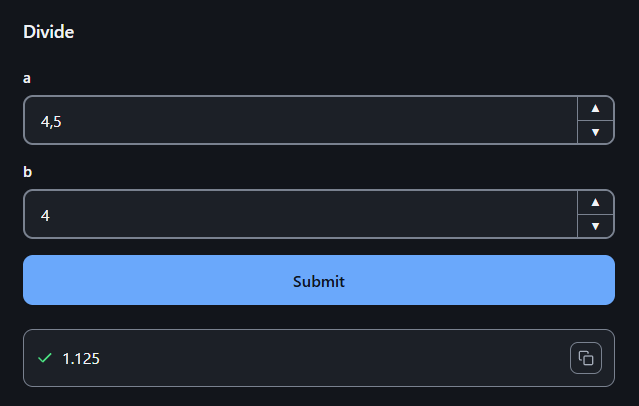
run(divide) is already a web application at http://127.0.0.1:8000: a form
for a and b, validation of both, and the result or the error on the same
page.
# One function, four ways to use it
The function you wrote is, at the same time:
-
a form, at
/divide/; -
an HTTP endpoint, for scripts, services and agents:
curl -X POST -H "Content-Type: application/json" \ -d '{"a": 10, "b": 2}' http://127.0.0.1:8000/divide/invoke # {"result": {"type": "text", "value": "5.0"}} -
a published contract, in plain text at
/doc, that tells a person or an agent how to call every function; -
a modal in your own frontend, opened with one line of
sdk.js.
It can run on its own with run(), or be mounted inside an existing FastAPI
application with app_of(). See Getting started.
# How it works
Your code does not change: no base classes, no decorators, no models. FuncToWeb reads the signature, and the type hints are the contract.
from dataclasses import dataclass
from typing import Annotated

from func_to_web import Choices, Label, Max, Min, run


@dataclass
class Order:
    product: Annotated[str, Label("Product")]
    quantity: Annotated[int, Min(1), Max(100)]
    priority: Annotated[str, Choices(values=("normal", "urgent"))] = "normal"


def create_order(order: Order) -> str:
    """Create a readable summary of an order."""
    return f"{order.quantity} × {order.product} ({order.priority})"


run(create_order)
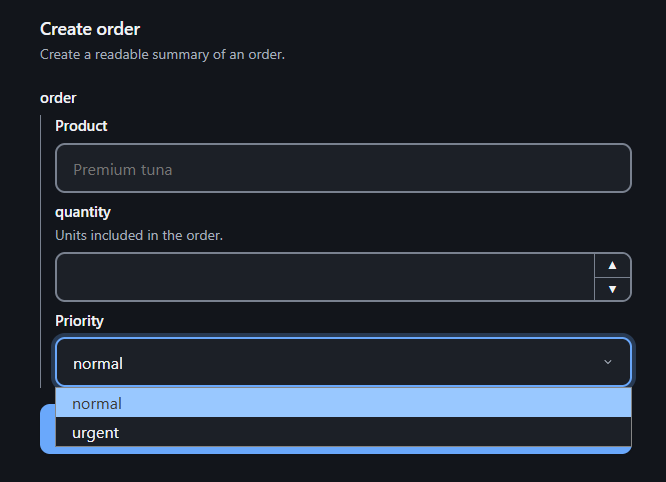
The form, the validation and /doc all come from that one definition, so adding
a field to Order updates all three. The function only runs with valid values:
quantity is always an int between 1 and 100.
Underneath there are three layers:
pytypehint compiles the signature and
validates, pytypehintweb turns it
into the form, and FuncToWeb adds the routes, the execution, the files and
/doc. Everything a function needs is imported from func_to_web.
# What else it does
- Files: a file parameter arrives as the path of a file already on disk. See Files.
- Outputs: return text, images, tables or files to download. See Outputs.
- Progress: what the function prints appears on the page while it runs. See HTTP API.
- Forms that lead to forms: open a form with values already filled in, or make one function open another. See Prefill and OpenForm.
# When to use it
FuncToWeb is for internal tools: admin tasks, scripts your team runs, small applications on top of existing code. Unlike Gradio or Streamlit, it never wraps your function or turns your script into an app: the same function is imported, tested and called as if the library were not there, and it runs under the authentication and routing of the FastAPI application you mount it in.
The whole stack is small: Starlette and Uvicorn carry the HTTP, and the two pytypehint layers the contract. There is no pydantic, no template engine and no build step.
How it works inside
Each function is compiled once, when the application is built: its schema
(pytypehint's Signature), its plan (the form the browser draws and /doc
publishes) and its base HTML. A definition that does not hold fails at startup,
never on a request.
GET  /{slug}/          the base HTML, or one built for a prefill
POST /{slug}/invoke    decode() → schema.build() → the function → outputs
decode() reads the JSON transport and, through FuncToWeb's file resolver,
swaps each file reference for its local path; schema.build() validates and
builds the arguments. FuncToWeb validates nothing on its own.
The public API is what func_to_web exports, plus the schema, plan and
html of a WebFunction. WebFunction.return_parser and
WebFunctions.forms are visible because the application needs them, but they
are internal state, not API.