Text
The Text module provides GPU-accelerated text rendering with full typography control using Pango markup.
Text is rendered to a new image sized to fit the content. The resulting image can be composited onto backgrounds, styled with effects, use as masks, or saved directly.
Basic Text Rendering
Render simple text with default styling.
Example:

Parameters:
text(str): Text to render (supports newlines for multiple lines)font(str): Font family name (default: "Sans")size(float): Font size in points (default: 12.0)color(tuple[float, float, float, float]): Text color in RGBA (default: black)bg_color(tuple[float, float, float, float]): Background color in RGBA (default: transparent)align(Literal['left', 'centre', 'right']): Text alignment (default: 'left')justify(bool): Justify text (default: False)spacing(int): Line spacing in pixels (default: 0)letter_spacing(float): Letter spacing in pixels (default: 0.0)dst_buffer(Image | None): Optional output buffer (default: None)u8_buffer(ImageU8 | None): Optional temporary buffer (default: None)
Returns: New Image containing rendered text (or None if dst_buffer provided)
Font Selection
Use any system font by name. Combine font family with weight/style for variations.
Example - Bold Font:

Available font modifiers: - Weight: "Light", "Regular", "Bold", "Black" - Style: "Italic", "Oblique" - Combine: "Arial Bold Italic", "Times New Roman Bold"
Note: Available fonts depend on your system.
Text and Background Colors
Control foreground and background colors independently.
Example - Colored Text on Background:

Use for: Badges, labels, alerts, UI elements with solid backgrounds
Text Alignment
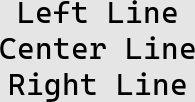
Align multi-line text left, center, or right.
Example - Center Aligned:
Example - Right Aligned:
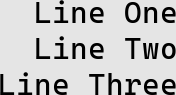
Available alignments: 'left', 'centre', 'right'
Letter Spacing (Tracking)
Adjust horizontal space between characters.
Example - Wide Tracking:

Use for: Title cards, logos, stylized headings, luxury branding
Note: Negative values tighten spacing; positive values expand it.
Line Spacing
Control vertical distance between lines of text.
Example:
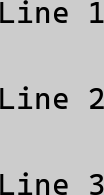
Use for: Improving readability, posters, artistic layouts
Rich Text Markup
Use Pango markup for rich formatting within a single text block.
Example:

Supported markup tags:
<b>...</b>- Bold<i>...</i>- Italic<u>...</u>- Underline<s>...</s>- Strikethrough<sup>...</sup>- Superscript<sub>...</sub>- Subscript<span foreground="color">...</span>- Text color (use color names or hex)<span size="larger">...</span>- Size variations<tt>...</tt>- Monospace
Note: When using markup with < or > characters, Pango automatically enables RGBA rendering for proper compositing.
UI Button Example
Combine text rendering with effects for polished UI elements.
Example:
from pyimagecuda import Text, Image, Fill, Blend, Effect, save

# Create text
text_img = Text.create(
    "START GAME",
    font="Arial Bold",
    size=30,
    color=(1.0, 1.0, 1.0, 1.0)
)

# Create button background
pad_w, pad_h = 60, 30
button = Image(text_img.width + pad_w,
               text_img.height + pad_h)

# Style button
Fill.color(button, (0.2, 0.6, 1.0, 1.0))
Effect.rounded_corners(button, 15)

# Composite text onto button
Blend.normal(button, text_img, anchor='center')

# Add drop shadow
final = Effect.drop_shadow(
    button,
    blur=10,
    offset_y=5,
    color=(0.0, 0.0, 0.0, 0.5)
)

save(final, 'text_ui_button.png')

# Cleanup
text_img.free()
button.free()
final.free()

Buffer Reuse
Reuse buffers for batch text rendering to avoid repeated allocations.
Example:
from pyimagecuda import Image, ImageU8, Text, save

# Pre-allocate buffers (ensure sufficient capacity)
dst = Image(1024, 512)
u8_temp = ImageU8(1024, 512)

labels = ["Label 1", "Label 2", "Label 3"]

for i, label in enumerate(labels):
    Text.create(
        label,
        size=48,
        dst_buffer=dst,
        u8_buffer=u8_temp
    )

    save(dst, f"label_{i}.png")

dst.free()
u8_temp.free()
Note: Buffers must have capacity for the largest text output. The u8_buffer is used internally for intermediate conversions.
Technical Notes
Rendering pipeline:
- Pango renders text to CPU memory (with anti-aliasing)
- Creates alpha mask from text
- Applies colors (foreground and background)
- Uploads to GPU as float32 RGBA
Font rendering:
- Uses system-installed fonts
- Full sub-pixel anti-aliasing
- Supports Unicode (emoji, international characters)
- Pango markup for rich text
Transparency:
- Default background is fully transparent
- Alpha channel preserved for compositing
- Set
bg_coloralpha to 0.0 for transparent backgrounds